
Before You Import a Carrier Commission File, Check These Five Things
Automate Your Commission Process
GreenWave Newsletter
Smarter strategies to simplify commissions, eliminate errors, and stay in control.
Commission Management Secrets
Find $100K+ Hiding in Your Commission Process.
Here’s a pattern we run into constantly.
Someone on the commission team loads carrier files the minute they arrive. Fast, responsive, eager to keep things moving — good instincts all around. But nothing gets renamed first, so the same file ends up loaded two and three times, and nobody catches it until the totals stop reconciling against cash.
That’s not a software problem, and it isn’t really a people problem either. It’s a missing step. Every commission operation has a moment between “the file arrived” and “the file is in the system,” and in most agencies nothing is attached to that moment at all.
What a bad file load actually costs you
The damage from a bad intake almost never shows up at intake. It shows up weeks later, wearing a different disguise:
- You pay producers off numbers that were never right. Correcting a payout after it’s gone out costs you the correction, the explanation, and some amount of trust you don’t get back.
- You investigate the wrong problem. A duplicate load looks exactly like a carrier overpayment until you go looking. Teams routinely spend days building a case against a carrier for a file they loaded twice.
- Your reconciliation stops meaning anything. If the source data is wrong, a clean reconciliation is worse than a messy one, because now you believe it.
- The knowledge lives in one person’s head. When the analyst who “just knows” how a particular carrier’s file behaves is out for a week, everything about that carrier slows down.
If that sounds like a rounding error, it isn’t, and it costs you twice.
The first cost is the money. Across the agencies we’ve worked with, commissions that never get properly reconciled run to roughly 18% of annual revenue — earned, owed, and never collected.
The second cost is the work of living with it. Every hour spent correcting errors, checking one system against another, and cleaning up what got through anyway is an hour nobody bills for. It never appears on a P&L as a loss. It shows up as headcount, overtime, and a team that never gets ahead. Research on the cost of bad data puts that drag in the same range as the leakage itself, and finds most of it is fixable at the source rather than the cleanup stage.
Four or five minutes at the front door is one of those fixes. Here’s the sequence.
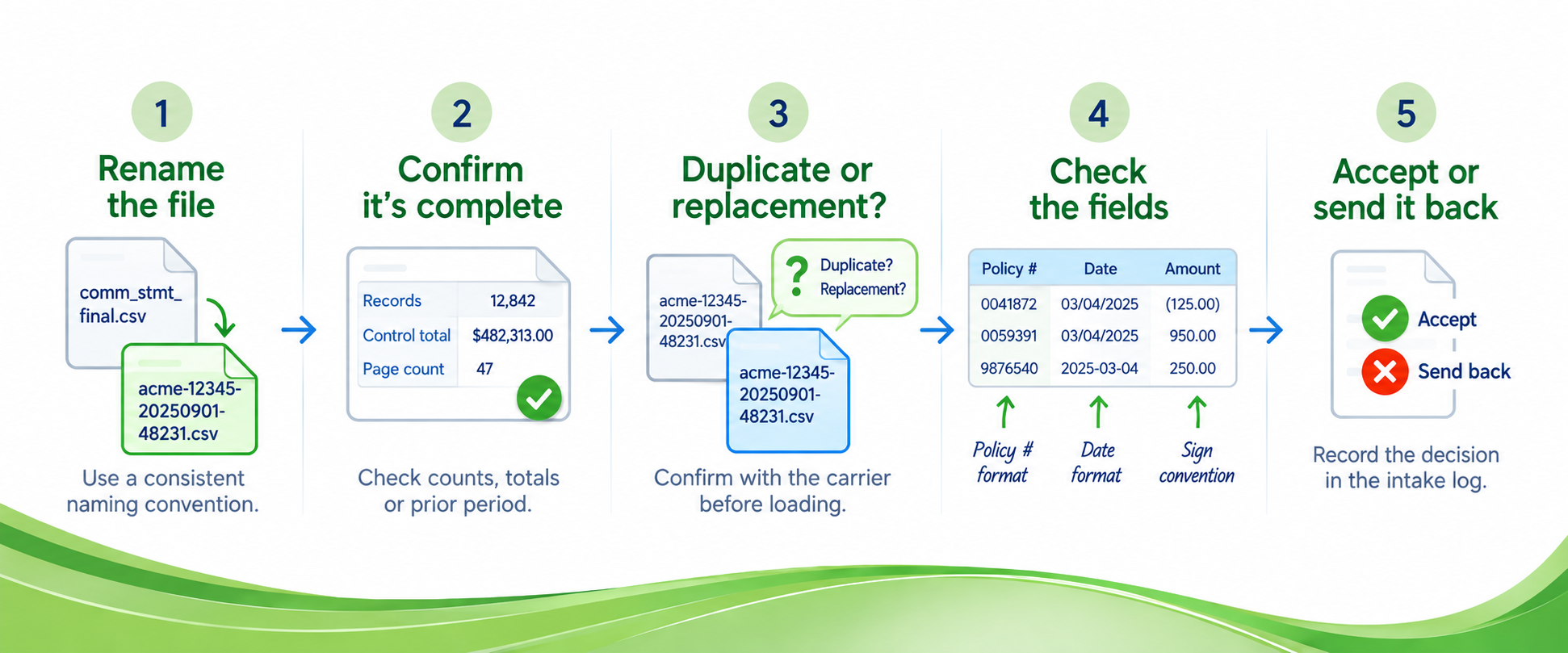
1. Rename the file before you touch it
The problem: You’ll receive comm_stmt_final.csv from three different carriers in the same week, and nothing in the filename tells you which is which, whether you’ve already loaded it, or what period it covers.
Why it happens: Carriers name files for their own internal convenience. They have no idea what else is sitting in your folder.
What to do: Rename on receipt, using a convention the whole team follows. We recommend carrier-agentcode-YYYYMMDD-amountreceived. The carrier tells you which format you’re about to open. The agent code tells you which entity was paid, which matters the moment you run more than one. The date in year-month-day order sorts chronologically in any file system without you doing anything. And the amount lets you spot a duplicate at a glance — same carrier, same date, same amount is a question you answer in five seconds instead of after a full load. Write your convention down, put it where the team can see it, and rename every file before it moves anywhere else.
2. Confirm the file is complete
The problem: A file that lost its last 400 rows opens cleanly, loads cleanly, and throws no error. There’s just a shortfall you’ll spend a month explaining.
Why it happens: Exports truncate and transfers drop, and neither event announces itself. The deeper issue is that most teams treat an incoming file as correct until something proves otherwise, and that assumption doesn’t survive contact with the evidence — clean records are the exception, not the default.
What to do: Compare what arrived against what the carrier says they sent — record counts, page counts, and control totals where the carrier provides them in a header or transmittal. Where they don’t, compare the record count to the prior period. Add a record-count check to your intake step and set a variance threshold — something like 30% — that triggers a call to the carrier instead of a load.
3. Check whether you’ve seen this file before
The problem: Two different situations hide behind the same symptom and require opposite responses. A duplicate is the same delivery arriving twice — you already have it, so you don’t load it. A replacement is a corrected file superseding one you already processed, and loading it on top of the original doubles your entries unless you back the first one out.
Why it happens: Carriers rarely label the difference clearly. A corrected file often arrives looking exactly like the original, sometimes with the same filename.
What to do: Treat any second arrival as a question, not a task. A two-hour delay waiting for an answer costs a fraction of an unwind. Before loading any file that matches one already in your system, get written confirmation from the carrier on whether it replaces or duplicates the earlier delivery.
4. Check the fields before you check the math
The problem: A policy number like 0041872 arrives as 41872 and matches nothing in your system. Dates show up in whatever order the source prefers, so 03/04 is either March 4th or April 3rd and the file won’t say. Negative amounts appear as a leading minus, a trailing minus, or parentheses depending on where they came from.
Why it happens: Often the culprit is the spreadsheet in the middle. Excel strips leading zeros and converts long numbers to scientific notation automatically, treating identifiers as quantities — quietly, and by default. Microsoft documents how to stop it, and it’s worth ten minutes with whoever handles files by hand.
What to do: Validate structure before you validate amounts. Deciding what commission was actually owed is a separate job, and mixing the two turns a formatting issue into a payment dispute. Keep a one-page field map per carrier — identifier format, date order, sign convention — and check the incoming file against it before any calculation runs.
5. Accept it or send it back, and record which
The problem: Six months from now someone asks why June was short from a particular carrier, and the answer lives in the memory of whoever handled it — if they’re still here.
Why it happens: Intake decisions feel too small to document. Then they compound.
What to do: Every file gets a decision and every decision gets recorded. If you’re returning it, name the specific problem and the contact you sent it to. If you’re accepting it with a workaround, write the workaround down, because the next analyst to touch that carrier will hit the same thing. Create a simple intake log — file name, date, reviewer, checks passed, decision — and make it the last step before any load.
Make it a checkpoint, not an audit
What makes this work is that it happens before the load, every time, by whoever receives the file. Not as a review performed afterward by whoever notices something is off.
If your team is loading files as they arrive and finding problems weeks later, the fix usually isn’t more scrutiny at reconciliation. It’s a real procedure at the front door.
Want to see what your current intake process catches and what it’s letting through? Book a call with our team and we’ll walk your process with you.
GreenWave Newsletter
Get practical insights, smarter workflow ideas, and helpful strategies designed to make commission management clearer, more efficient, and easier to control.

Commission Management Secrets
Our concise guide will help you maximize profitability, speed and precision in your business’ commission management process.